

www.farmboyzimsflightsims.com
FBZFS
Click On Any Picture For A Larger View



Thanks For The Visit !
I have been using the utility PerfectDisk for defragging my system for 3 years now, and it has done a great job of putting things in order on my internal and external disc drives. Raxco has upgraded the utility to PerfectDisk 2008. As I had no complaints with the older version, I was expecting nothing less than another great utility to keep things squared away on my computer. I was not disappointed!
So, what exactly is a "squared away" computer? One that operates as fast as it is able to, putting it simply. Let me explain briefly, what "Fragmentation" means.
Your Hard Drive stores loads of information. Defragging along with other basic computer maintenance makes for a faster running computer. "Defragging" your computer means having a utility that will sort through the drives that you have installed, and then place files and folders together that should be together. This all sounds like a complicated process, but PerfectDisk 2008 does this for you with surprising ease. With a host of other functions PD2008 will have your computer running as fast as a dragster in the quarter mile! One very good point about this utility is that it is very "user-friendly".
So, what exactly is a "squared away" computer? One that operates as fast as it is able to, putting it simply. Let me explain briefly, what "Fragmentation" means.
Your Hard Drive stores loads of information. Defragging along with other basic computer maintenance makes for a faster running computer. "Defragging" your computer means having a utility that will sort through the drives that you have installed, and then place files and folders together that should be together. This all sounds like a complicated process, but PerfectDisk 2008 does this for you with surprising ease. With a host of other functions PD2008 will have your computer running as fast as a dragster in the quarter mile! One very good point about this utility is that it is very "user-friendly".
Here's an analogy for you that I found helpful in understanding the fragmentation concept; Imagine your hard drive as one long street with vehicles of varying sizes parked along it. There's a little compact car, behind it a pickup truck, then another small car, and whoa, behind it a huge Recreational Vehicle, taking up at least three parking spaces! Behind it another car, etc., you get the idea. Now, imagine that the huge RV pulls out of its space and proceeds on to their destination, wherever that may be, probably a gas station to fill up the monster! What happens is that in this town, the parking laws say that you can't pull into an empty space, but you must go to the end of the line and park there! Not a very bright law! Your hard disc is like that street. When you dump something out, it leaves a void on the disc that won't be filled, since the new add on or whatever must go to the end of the disc and load. As you can see, this leaves "parking spaces" or gaps throughout the disc, wasting space. What PerfectDisk does is it comes in and puts all the files and folders in the correct places so the cpu doesn't take extra time searching all over your HD for them, and it consolidates your space on the drive, as if a huge bulldozer came along and shoved all the cars into one neat row (well, with a bulldozer, you can only be so neat!), freeing up huge amounts of "parking spaces" for other "vehicles"/software to "park".
If you install and uninstall flight sim software, you know that some of these packages are pretty large in the Megabyte department. A single freeware aircraft, if it is a decent model, can be as large as 10 or more megabytes. That doesen't sound like much, but like the old drop in the bucket theory I like to use, it all adds up. A bit here, a byte there...I couldn't help it! Pun intended! I personally defrag all my drives at least once a week. You will see many schools of thought on this, from that's too often to that's not often enough. It's simply a case by case issue. How much do you use your computer? How often are you installing and removing programs? I installed PerfectDisk 2008 onto an older Gateway laptop that my nephew had given to my wife. He had it for a few years himself, using it for college work, and gaming. Computer Maintenance was not on his list of priorities at the time, I suppose, for he could not ever recall running the routine maintenance programs. I should point out that befor I loaded the utility up on the laptop, I did run the inherent defragger, which to some degree, cleaned things up a bit. After PerfectDisk analyzed the drive, I could see for myself, just how much of the disc was still untouched. A noticable difference in performance was noted by my wife after using her laptop.
PerfectDisk will analyze your drives to determine if defragging is necessary or not. Just the other day, after a defrag, it told me that I had too much data on my main hard drive. Even 160 Gb of space can fill up if you are not paying attention, which I was not! You need a certain amount of free space on your hard drive, and this utility will keep watch for you. This utility really digs deep into realms of the computer, going into places in your system that the "default" defragger just won't tread.
I know I've made this sound rather simple and non-technical. For all the specs you can visit the Raxco site and see for yourself what they have to offer. What's really nice is that yu have the option to try the utility for free for 30 days. I'll warn you though, you will be hooked, and for the better! They have been the recipients of awards and some pretty impressive companies and institutions not only use PD2008, , but a host of other utilities for a range of maintenance needs.
Below is some screenshots of the utility in "action" with some notes as to what functions is being displayed.
If you install and uninstall flight sim software, you know that some of these packages are pretty large in the Megabyte department. A single freeware aircraft, if it is a decent model, can be as large as 10 or more megabytes. That doesen't sound like much, but like the old drop in the bucket theory I like to use, it all adds up. A bit here, a byte there...I couldn't help it! Pun intended! I personally defrag all my drives at least once a week. You will see many schools of thought on this, from that's too often to that's not often enough. It's simply a case by case issue. How much do you use your computer? How often are you installing and removing programs? I installed PerfectDisk 2008 onto an older Gateway laptop that my nephew had given to my wife. He had it for a few years himself, using it for college work, and gaming. Computer Maintenance was not on his list of priorities at the time, I suppose, for he could not ever recall running the routine maintenance programs. I should point out that befor I loaded the utility up on the laptop, I did run the inherent defragger, which to some degree, cleaned things up a bit. After PerfectDisk analyzed the drive, I could see for myself, just how much of the disc was still untouched. A noticable difference in performance was noted by my wife after using her laptop.
PerfectDisk will analyze your drives to determine if defragging is necessary or not. Just the other day, after a defrag, it told me that I had too much data on my main hard drive. Even 160 Gb of space can fill up if you are not paying attention, which I was not! You need a certain amount of free space on your hard drive, and this utility will keep watch for you. This utility really digs deep into realms of the computer, going into places in your system that the "default" defragger just won't tread.
I know I've made this sound rather simple and non-technical. For all the specs you can visit the Raxco site and see for yourself what they have to offer. What's really nice is that yu have the option to try the utility for free for 30 days. I'll warn you though, you will be hooked, and for the better! They have been the recipients of awards and some pretty impressive companies and institutions not only use PD2008, , but a host of other utilities for a range of maintenance needs.
Below is some screenshots of the utility in "action" with some notes as to what functions is being displayed.


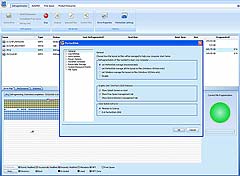
PD2008 will ask if you want to set up a schedule for maintenance.
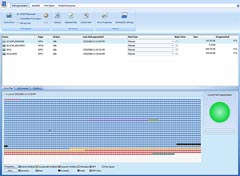
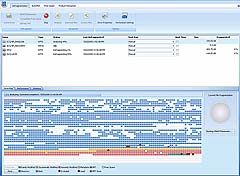
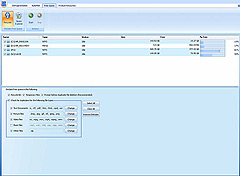
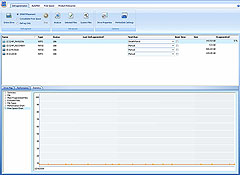
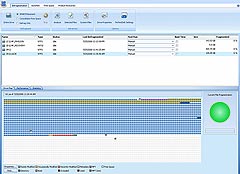
Analyzing and then defragging chosen drives. As you can see, my C drive is getting a bit crowded.
Among the many things PD2008 can do, it can also search out duplicate files of various types, giving you the option to do some "housecleaning".
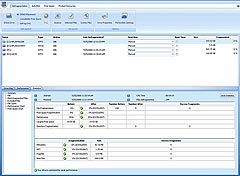
The Statistics Tab displays valuable information. In this case, the amount of free space on my C drive (not much!).
All done! Drive C is squared away...
...as is my external Disc N.
Statistical Summary of how yor computer is looking. I had a "poor" reading in the "largest free space" of C drive recently, and moved some folders out to an external drive, and everything was fine.
To sum it all up, the utility works great, makes a HUGE difference for my system operation, and has not affected my system in any negative way at all, no matter how often I defrag! I highly reccommend that you check out the free trial, but be prepared to purchase the permanent copy, for I think you will find that life is a little more pleasant when things run smoothly! One last thing, Raxco has not paid for this review or advertisement, but a copy of the utility was graciously given to me for review.
Visit Raxco for more information that's easily understood for both us "non-tech" types and "tech-savvy" types!
www.raxco.com
Visit Raxco for more information that's easily understood for both us "non-tech" types and "tech-savvy" types!
www.raxco.com
Here's some information from the Raxco website, explaining some of the new features of PerfectDisk 2008...
A brand-new user interface
A new user interface makes it easier than ever to use PerfectDisk. Menus and toolbars have been replaced with a ribbon that organizes and presents capabilities into a set of tabs that correspond to how the product is used. The tabs on the ribbon display the commands that are most relevant for each of the task areas in PerfectDisk. New wizards are also now included, providing easier setup.
StealthPatrol™ automatic disk defragmentation
PerfectDisk now provides the ability to automatically perform defragmentation only when your system is idle. Together with the wide range of scheduling options available with AutoPilot Scheduling, PerfectDisk 2008 provides more flexibility, automation and complete control than any other disk defragmenter.
Improved performance and reduced resource usage
PerfectDisk has been enhanced to run even faster during SMARTPlacement defragmentation passes. The engine also now uses 15% - 20% less memory consumption than PerfectDisk 2008, which results in additional improved performance.
Selected Files Defrag
PerfectDisk's Single File Defrag has been replaced with Selected Files Defrag, giving users the ability to select multiple files to defragment, rather than the entire drive. The ability also now exists to select files from the "Most Fragmented Files" list for immediate and automatic defragmenting.
Fragmeter
A new graphical view of how fragmented your drive is. PerfectDisk 2008's powerful bit map display of disk drives is now enhanced with a new, colorful and easy-to-view circular graphic of your drive's level of fragmentation.
Free Space Recycler
PerfectDisk now provides the ability to easily and automatically reclaim valuable free space from your Recycle Bin, Temporary Internet Files, and duplicate text, picture, video and music files.
Space Explorer
See a bird's eye view of the space distribution between files and folders inside your drives' directories. PerfectDisk 2008's Space Explorer also allows you to delete large files to recapture valuable space on your drive.
Enhanced system tray icon functionality
Additional capabilities are now available through the system tray icon, providing additional ease-of-use.
Estimated Time to Completion
PerfectDisk now provides the estimated time of day when a defrag run will complete.
Native support for 64-bit platforms
Native support for 64-bit platforms provides improved performance and efficiency on 64-bit platforms.
Enhanced Active Directory Integration
A new Active Directory tab is now available for those enterprises utilizing Active Directory, allowing for easy Active Directory snap-in and loading of the PerfectDisk 2008 Administrative template.
PerfectDisk 2008’s patented SMARTPlacement™ optimization is paired with its exclusive single-pass defragmentation and Space Restoration Technology™ to maximize PC and laptop performance. All controlled and automated according to your unique requirements through AutoPilot Scheduling™ or StealthPatrol™ unattended background processing
A visit to the Raxco website provides loads of information and testimonials (I suppose that's what this review is!), and links for questions about their products. In the proverbial "nutshell", PerfectDisk 2008 is a simple to use utility that performs extremely well! I was surprised at how many people I know that do not even use the default defragger! In most cases, the concept of fragmentation was unknown to the user and they were unaware that there was something that could be done about it. People were sometimes amazed at what just a little maintenance could do. I don't mind saying that I was surprised at the difference in performance. Honestly, I had thought that this was initially a utility that someone "dressed up a bit" and made it look fancier than the default utility that all computers come with. That's where I was most definitely wrong. A little more research on my part really opened my eyes to what goes on in the "minds" of our CPU's! I want to emphasize that the processes that PD2008 performs are quite in-depth, but with a very user-friendly interface.
A brand-new user interface
A new user interface makes it easier than ever to use PerfectDisk. Menus and toolbars have been replaced with a ribbon that organizes and presents capabilities into a set of tabs that correspond to how the product is used. The tabs on the ribbon display the commands that are most relevant for each of the task areas in PerfectDisk. New wizards are also now included, providing easier setup.
StealthPatrol™ automatic disk defragmentation
PerfectDisk now provides the ability to automatically perform defragmentation only when your system is idle. Together with the wide range of scheduling options available with AutoPilot Scheduling, PerfectDisk 2008 provides more flexibility, automation and complete control than any other disk defragmenter.
Improved performance and reduced resource usage
PerfectDisk has been enhanced to run even faster during SMARTPlacement defragmentation passes. The engine also now uses 15% - 20% less memory consumption than PerfectDisk 2008, which results in additional improved performance.
Selected Files Defrag
PerfectDisk's Single File Defrag has been replaced with Selected Files Defrag, giving users the ability to select multiple files to defragment, rather than the entire drive. The ability also now exists to select files from the "Most Fragmented Files" list for immediate and automatic defragmenting.
Fragmeter
A new graphical view of how fragmented your drive is. PerfectDisk 2008's powerful bit map display of disk drives is now enhanced with a new, colorful and easy-to-view circular graphic of your drive's level of fragmentation.
Free Space Recycler
PerfectDisk now provides the ability to easily and automatically reclaim valuable free space from your Recycle Bin, Temporary Internet Files, and duplicate text, picture, video and music files.
Space Explorer
See a bird's eye view of the space distribution between files and folders inside your drives' directories. PerfectDisk 2008's Space Explorer also allows you to delete large files to recapture valuable space on your drive.
Enhanced system tray icon functionality
Additional capabilities are now available through the system tray icon, providing additional ease-of-use.
Estimated Time to Completion
PerfectDisk now provides the estimated time of day when a defrag run will complete.
Native support for 64-bit platforms
Native support for 64-bit platforms provides improved performance and efficiency on 64-bit platforms.
Enhanced Active Directory Integration
A new Active Directory tab is now available for those enterprises utilizing Active Directory, allowing for easy Active Directory snap-in and loading of the PerfectDisk 2008 Administrative template.
PerfectDisk 2008’s patented SMARTPlacement™ optimization is paired with its exclusive single-pass defragmentation and Space Restoration Technology™ to maximize PC and laptop performance. All controlled and automated according to your unique requirements through AutoPilot Scheduling™ or StealthPatrol™ unattended background processing
A visit to the Raxco website provides loads of information and testimonials (I suppose that's what this review is!), and links for questions about their products. In the proverbial "nutshell", PerfectDisk 2008 is a simple to use utility that performs extremely well! I was surprised at how many people I know that do not even use the default defragger! In most cases, the concept of fragmentation was unknown to the user and they were unaware that there was something that could be done about it. People were sometimes amazed at what just a little maintenance could do. I don't mind saying that I was surprised at the difference in performance. Honestly, I had thought that this was initially a utility that someone "dressed up a bit" and made it look fancier than the default utility that all computers come with. That's where I was most definitely wrong. A little more research on my part really opened my eyes to what goes on in the "minds" of our CPU's! I want to emphasize that the processes that PD2008 performs are quite in-depth, but with a very user-friendly interface.
Review of the utility
PerfectDisk 2008
By Farmboyzim
PerfectDisk 2008
By Farmboyzim